How does QR code gym entry work?
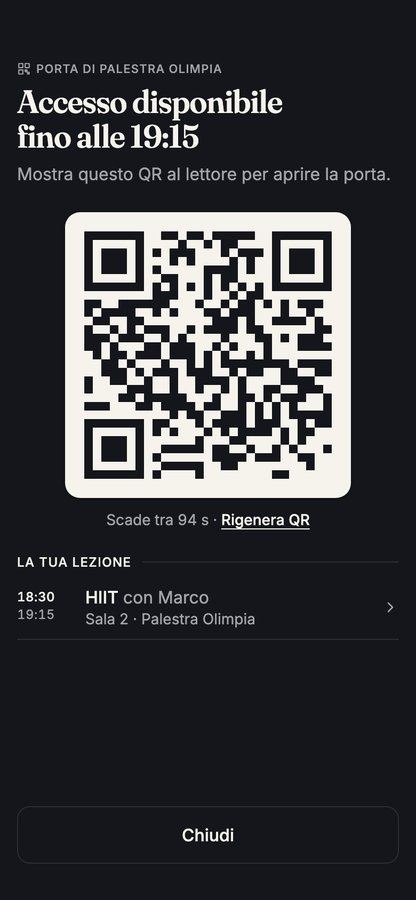
Four pieces work together: the code on the member's phone, a reader at the entrance, the software that checks the membership, and the lock or turnstile that opens.
The whole check takes a moment at the door. What matters is that the decision is made by the membership, not by whoever happens to be at reception.
- The member opens the gym's app, or the pass saved in their phone's Wallet, and holds the code to the reader
- The reader sends the code to the management software
- The software checks whether that membership is valid at that moment
- If it is, the door or turnstile opens; if not, it stays shut
- The entry or the refusal goes into the log, with the name and the time
QR code, Wallet pass, card or fob: which is better?
Cards and fobs work, but they are objects: you buy them, hand them out, replace them when they are lost and try to collect them when someone leaves, which rarely happens. A code on the phone costs nothing to issue and stops opening the door the moment the membership ends.
A Wallet pass adds convenience: the member does not need to open an app, and the pass is one tap away on the phone. Keep a fallback for the few members without a smartphone, such as check-in at reception during staffed hours.
Who gets in, and when?
Access should follow the membership, automatically. Decide the rules once, write them in your house rules, and let the system apply them at every door.
A refusal is information, not just a closed door. A member trying to come in on an expired membership is a renewal waiting to happen.
- Valid membership: the door opens
- Expired or unpaid membership: it stays shut, and the refusal is logged
- Leads and trials: best kept to staffed hours, so a person meets them on the first visit
- Unstaffed hours: many gyms ask for an induction before a member gets access
- Memberships limited to certain hours: check that your system can apply the limit at the door
What is the entry log for?
Every entry and every refusal, with the name and the time. In daily use it answers simple questions: who came in overnight, how busy the early hours are, who has not been in for weeks.
It is also your record when something goes wrong. If a code is shared, the log shows an entry under one member's name, and camera footage shows who walked in. Your house rules should say that access is personal and what happens if it is shared.
What should I plan for cameras?
Cameras are a separate system from access control, and the decisions about them are yours as the operator. This is not legal advice: data protection rules apply when you record people, so check your plan with an adviser before you install anything. These are the topics to cover.
- Where they go: the entrance and the areas where people train, never changing rooms or toilets
- What they record: images only or sound too, all the time or only on movement
- How long footage is kept, who can see it, and how a person can ask for a copy
- Signs at the entrance and in each room that tell people they are being recorded, and by whom
- Who installs and maintains the system, and who you call when it fails
What do I need to install?
Start from what you have. Many gyms already have a turnstile or an electric lock that can work with a reader; others need the lock as well.
Test it with staff before you switch it on for members, and keep reception staffed for the first weeks so someone can help with each member's first entry.
- A reader for QR codes at each entrance
- A door lock or turnstile that the reader can open
- A reliable network connection at the door
- A plan for power cuts and network failures: how the door behaves, and how members get out
- An emergency exit that always opens from the inside
How does automatic access work on Yeki?
Automatic access is part of Yeki's free gym management software. Every member has a QR code on their phone and in their Wallet. A reader at your door or turnstile reads it, Yeki checks that the membership is valid at that moment, the door opens or stays shut, and every entry and refusal is logged. Turnstile integration is included, and during staffed hours members check in at reception with the same code, into the same log.
When a membership ends or is not paid, the code stops opening the door, with nothing to collect. The same app is your gym membership software: it sells memberships, class packs and drop-ins, with payments straight into your bank account, so a member who is refused can renew from their phone. Leads and trials are handled at reception, up to the first purchase.
Cameras are not part of the app. We help you set them up: we advise you on where they go and coordinate the installation, with an installer if you need one. Tell us what you have fitted at your door today when you get in touch.